

-
What’s new in immersive media for visionOS
Get to know the different types of media you can make for apps, games, and experiences in visionOS. Learn about updates for 2D and 3D video, spatial video, and more immersive media formats like 180, 360, Wide FOV, and Apple Immersive Video.
This session was originally presented as part of the Meet with Apple activity “Create immersive media experiences for visionOS - Day 1.” Watch the full video for more insights and related sessions.Resources
Related Videos
Meet with Apple
-
Search this video…
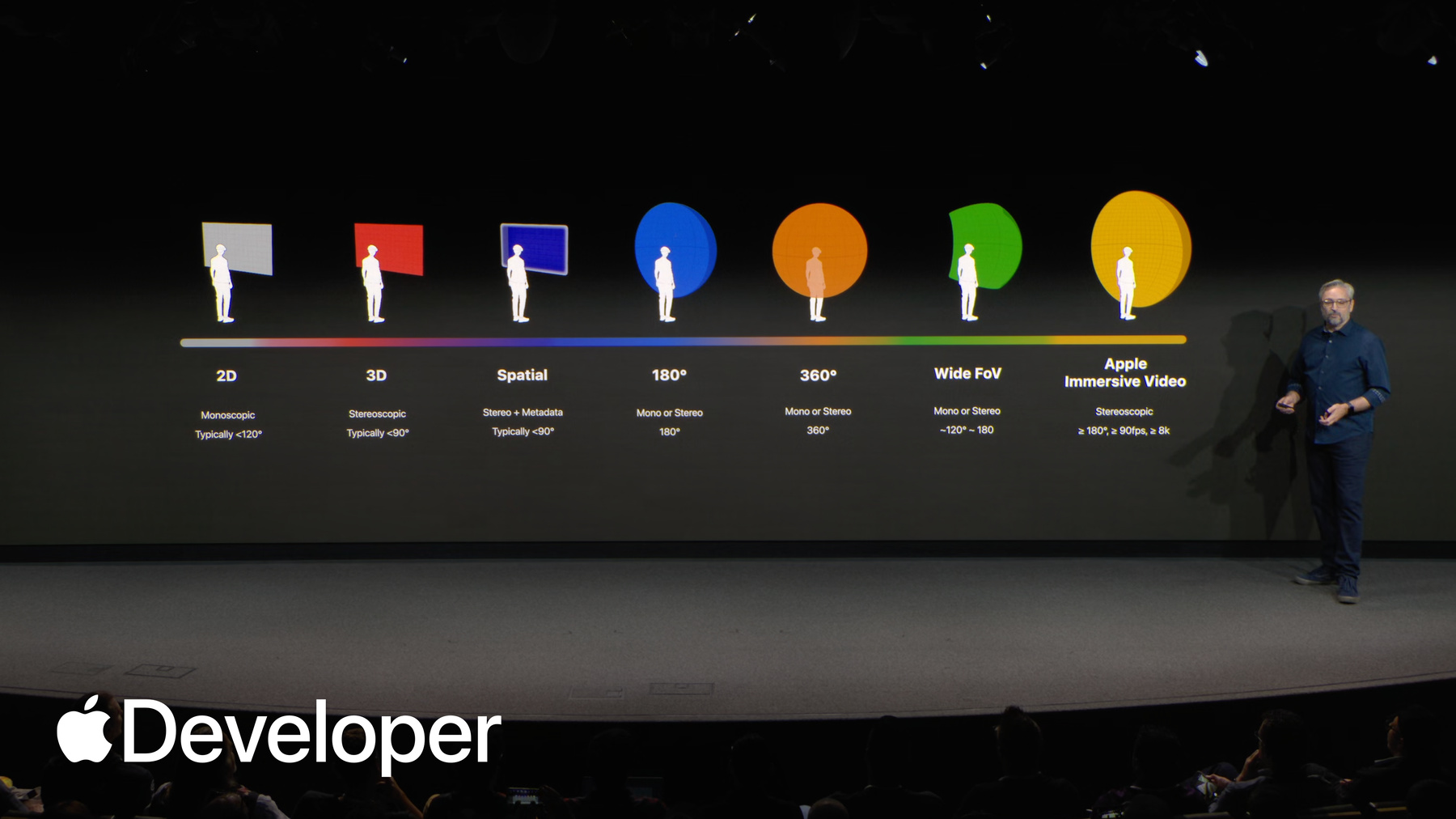
Today, we'll explore all of the different types of video media available on visionOS. These include regular 2D video, 3D stereoscopic movies, spatial videos, and for the ultimate immersive media experience. Apple Immersive Video.
I'm very happy to say that with visionOS 26, we've added support for three additional immersive media projection types 180 degree, 360 degree, and wide field of view.
Let's start by exploring 2D and stereoscopic 3D video and how it can be presented on visionOS, including some amazing new features. Now available in visionOS 26.
Vision Pro is a great device for watching movies and TV shows, and as a stereoscopic device, it's the perfect way to to deliver 3D movies.
2D and 3D videos can be played inline anywhere within an app. When using an embedded playback experience where the video appears alongside other UI elements. Here's an example of an inline video playing in Freeform as part of a board full of content.
Note that if you embed a 3D video inline, it gracefully falls back to playing in 2D.
Your 2D and 3D video can also be played in an expanded experience that fills the entirety of an app's window. Here, 3D content can be played stereoscopically with full dimension and depth. You can also create immersive video experiences for your 2D or 3D content inside an app. Here's an example from Destination Video, a sample code project available from Developer.apple.com. When video plays in the expanded view, pass through video automatically dims But you as a developer can go further. You can enable custom docking regions to allow your video to play back in a system environment like Mount Hood, or create your own custom environment where you can add features like audio reverb and dynamic light spill to make your content feel like an internal part of that environment. Need to show multiple pieces of content in your app at once. visionOS also supports multi-view video, so you can deliver multiple camera angles of a single event or multiple sources of video simultaneously in Vision Pro and new to visionOS. 26. 2D and 3D videos can specify a per frame dynamic mask to change or animate their frame size and aspect ratio, without needing to know to show black bars for letterboxing or pillarboxing.
This is really useful if you need to accentuate a story point, or to combine archival and modern day footage in a single scene. And these kinds of seamless transitions are only possible on visionOS.
But what if you want to create stereoscopic 3D content without the complex production pipelines of a big studio? Well, in visionOS One we introduced a new kind of stereo media known as spatial video. Spatial Audio is the easiest way to shoot comfortable, compelling stereo 3D content on devices like iPhone or Vision Pro without needing to be an expert in the rules of 3D filmmaking.
Spatial video is just stereo 3D video, with some additional metadata that enables both windowed and immersive treatments on visionOS to mitigate common causes of stereo discomfort.
By default, spatial video renders through a portal like window with a faint glow around the edges. It can be expanded into its immersive presentation where the content is scaled to match the real size of objects.
The edge of the frame just disappears, and the content blends seamlessly into the environment around you.
And if you have a media app designed for multiple Apple platforms, spatial videos automatically fall back to a 2D presentation. This enables you to deliver spatial content for Vision Pro, while also providing great 2D content for people on other platforms.
Spatial videos can be captured today on many models of iPhone with the camera app or in your own app via AV capture device APIs. Spatial videos can also be captured directly on Apple Vision Pro and with Canon's R7 and R 50 cameras with the canon dual lens.
And if you're looking to edit and combine spatial videos in your app to create a longer narrative. The format is now supported in post tools such as Compressor, DaVinci Resolve Studio and Final Cut Pro for Mac.
Creators are already capturing and sharing some incredible spatial videos and photos. Check out the Spatial Gallery app for visionOS to experience how people are already using this format to tell stories from new perspectives.
We've been talking a lot about spatial video, but visionOS 26 can now present photos and other 2D images in a whole new way. We call these spatial scenes.
Spatial scenes are 3D images with real depth generated from a 2D image like this. Was there like a diorama version of a photo with the sense of being able to look around objects as the viewer moves their head relative to the scene. Seen.
People are already using spatial scenes in their experiences, like the classic car showcase Paradise. In addition to some spectacular 3D models, people can browse spatial scenes for each car to see them out in the wild.
So we've seen how 2D, 3D, spatial videos, and spatial scenes are all presented on a virtual flat surface in visionOS. This is because those videos typically use what's known as a rectilinear projection, as seen in this photo of the Apple Park Visitor Center. Rectilinear just means that straight lines are straight. There's no lens curvature or warping in the video. And because of this, these kinds of videos feel correct when viewed on a flat surface that also doesn't have any curvature or warping.
But on a spatial computing device, we're not just restricted to flat to a flat surface in front of the viewer. Sometimes you want to tell stories that break beyond the frame.
For that, we can use non-rectilinear projection types that curve around the viewer. visionOS 26 adds support for three of these Non-rectilinear media types 180 degree, 360 degree and wide field of view video in visionOS 26. These immersive video types are supported natively on visionOS via a new QuickTime movie profile called Apple Projected Media Profile or Apmp. A wide range of cameras are already available to shoot these types of videos with Apmp. Let's take a look.
180 degree video is presented on a half sphere or a hemisphere directly in front of the viewer.
The video completely fills the viewers forward field of view. In this example, it's a 180 degree video of the pond here at Apple Park.
From the viewer's point of view, it's like being there. This is a great way for content creators to transport their viewers to amazing locations.
360 degree video takes things a step further, filling the entire world with content. With 360 degree video, the content literally surrounds the viewer, giving them the freedom to look wherever they like.
Here's an example of a 360 video captured underneath the rainbow across the street at Apple Park. The viewer can look around at any angle and feel like they are right there beneath the rainbow. Everything looks just as it would if they were there in person.
To achieve this, the 360 video is projected onto the inside of a sphere completely surrounding the viewer, centered on their eyes and filling their field of view whichever way they look. A rectangular video frame twice as wide as it is high is used to achieve this. The video is mapped onto a sphere around the viewer with an equirectangular projection, or Aqua for short.
180 degree video also uses equirectangular projection, but only for half of a sphere, so it's known as half erect projection. Half erect videos have a square aspect ratio and map their video onto a hemisphere in the same way. 360 does for a full sphere.
For stereoscopic 180 video, we simply have two squares of video, one for each eye.
Many existing stereo 180 videos encode these two squares side by side in a single pixel buffer that's twice as wide as the resolution per eye. This is known as side by side or frame packed encoding, but there's an awful lot of redundancy here because there are two views of the same scene. The left and right eye images are very similar. visionOS takes advantage of the similarity to use a different approach for encoding stereo 3D video.
We use multiview encoding.
So you're probably already very familiar with High Efficiency video Coding or Hevc for stereoscopic videos. App Nap uses Hevc or Multiview Hevc.
MV, Hevc encodes high into its own pixel buffer, and it writes those two pixel buffers together in a single video track. It takes advantage of the image similarity to compress one eye's pixels relative to the other, encoding only the parallax differences for the second eye.
This results in a smaller encoded size for each frame, making MV Hevc videos smaller and more efficient than typical frame packed video. This is really important when streaming stereo video.
And in fact, MV HEVC is the preferred way to encode all stereoscopic media for streaming to visionOS from Spatial Audio to Apple Immersive Video.
So let's turn our attention to one of the most unique types of APM App Nap video, now supported in visionOS 26 wide field of view video from action cams such as GoPro hero 13 and Insta360 Pro two, these action cams capture highly stabilized footage of whatever adventures you take them on. They capture a wide horizontal field of view, typically between 120 and 180 degrees, and often use fisheye like lenses that show visible curvature of straight lines in the real world. This enables them to capture as much of the view as possible.
Traditionally, these kinds of videos have been enjoyed on flat screen devices like iPhone and iPad, and this is a fun way to relive the adventure. But in visionOS 26, we're introducing a new form of immersive playback for these kinds of action cams, recreating the unique wide angle lens profile of each camera as a curved surface in 3D space, and placing the viewer at the center of the action.
Because that curved surface matches the camera lenses profile, it effectively undoes the fisheye effect, and the viewer sees straight lines as straight, even at the edges of the image. This recreates the feeling of the real world as captured by the wide angle lens.
Action cams all have different lenses with different shapes and profiles to model these different lens profiles. App Nap defines a bunch of lens parameters. Camera and lens manufacturers can tailor these parameters to describe a wide variety of lenses, and how those lenses map the real world onto pixels in an image. Because it's defined by parameters, we call this projection parametric immersive projection. And it's how the projection of wide field of view video is understood by visionOS.
Playing Apmppe. Apmppe video Immersively puts the viewer's head right where the camera was during capture, even if that camera was strapped to the end of a surfboard. This means that immersive playback is especially sensitive to camera motion.
And excessive motion makes viewers uncomfortable. To help mitigate this, in visionOS 26, playback will automatically reduce the immersion level when high motion is detected, which can be more comfortable for the viewer during high motion scenes. The settings app also offers options so viewers can customize high motion detection to their personal level of motion sensitivity.
Now, if you're anything like me, you probably have a bunch of old Vr180 and 360 footage, but haven't had an easy way to watch or share those videos on visionOS.
So to make converting your 180 and 360 videos from the past a little easier, we've also updated the Avi convert command line tool in macOS 26 to convert legacy 180 and 360 content to Apmp.
And if you're not comfortable using the command line, we've also added new presets to the Avi convert functionality in Finder on Mac OS, which allows you to simply use the contextual menu on most legacy stereo 180 or 360 videos and then choose one of the new Hevc presets.
And for developers, this all leads us to playback in your own apps. App Nap can be played on visionOS 26 by all media playback frameworks like RealityKit, AVKit, Quicklook, and WebKit so you can integrate it into whatever type of experience you build.
We're very excited to announce that Vimeo now supports upload and playback of 180 degree and 360 degree App Nap content, in addition to 2D and spatial video.
So even if you don't have an app of your own yet, you can share your App Nap videos to audiences across all platforms.
So that's Apple. Projected media profile. Now, for the ultimate experience, there's Apple Immersive Video, which we're making available to developers and content creators for the first time this year. It's here's an example from the Apple TV series wildlife, which transports viewers to meet the elephants at Kenya's Sheldrick Wildlife Trust. This scene would be almost impossible to experience in reality, but with Apple Immersive Video, it feels like you're truly there.
Companies like Canal+, Red bull, CNN, the BBC and Rogue Labs are currently creating Apple Immersive content with Canal+ MotoGP tour de force already available to experience through the TV app.
And we're also very excited to be partnering with spectrum to stream a selection of live LA Lakers regional games early next year and Apple Immersive via the spectrum Sportsnet app.
This is Apple's very first live Apple Immersive experience, and we can't wait for Vision Pro owners to feel the intensity of a live NBA game as if they were courtside.
As a creator, this is the perfect time to explore making content with Apple Immersive Video because you now have an end to end pipeline to help you create, edit, mix, and distribute this content.
You can capture Apple Immersive Video using Blackmagic Designs or Immersive Camera. Then do your editing, VFX, Spatial Audio mix and color correction on the Mac .Mac in DaVinci Resolve studio, you can preview and validate using the new Apple Immersive Video utility app, available on the App Store for both Mac OS and visionOS. And then if you're preparing your content for streaming, you can create segments in the upcoming version of Apple's Compressor app for distribution via HTTP Live streaming, or HLS.
Many other companies are already working on support for the Apple Immersive workflow, and this includes Color front for dailies and mastering and spatial Gen for encoding and distribution.
And we're incredibly excited to announce that Vimeo plans to support hosting Apple Immersive video content.
For developers of pro apps, or anyone who wants to create their own tools to work with Apple Immersive Video. There's a framework in Mac OS and visionOS 26 called Immersive Media Support that lets you read, write, and stream Apple Immersive content. And there's a code sample called authoring Apple Immersive Video to get you started.
Apple Immersive Video can be played on visionOS 26 by all of our media playback frameworks like RealityKit, AV Kit, Quicklook, and WebKit with support for HLS streaming.
But at this point, you might be asking what makes Apple Immersive Video so special? Well, several of you may have already started shooting with the new Blackmagic Ursa Cinema Immersive Camera from Blackmagic Design. If not, those of you here in person will be able to check out the camera later this afternoon during our hands on sessions.
The specs for the Ursa Immersive Camera are astounding. Every lens and every camera is individually calibrated at the factory using a parametric approach similar to what we saw earlier, but tuned for each individual lens and sensor pair. The Ursini immersive captures stereo video with 8160 by 7200 pixels per eye. That's 118 megapixels total at 90 frames a second.
That's over 10 billion pixels per second.
The Ursini immersive captures up to 210 degree field of view horizontally and 180 degree vertically, with a perceptual sharpness approaching that of the human eye. But resolution and framerate isn't the whole story.
There are so many more capabilities of Apple Immersive Video unique to the format. I'd like to quickly tell you about a few of my favorites.
The first is Dynamic Edge Blends.
Every shot in an Apple Immersive Video can define a custom edge blend curve that best suits its content and framing. This isn't a baked in mask, it's a dynamic alpha blend curve that feathers the edges of the shot at playback time to transition seamlessly into the background.
Another feature unique to Apple Immersive Video is support for static foveation of the final video encode.
It would be impractical to stream the full 8-K per eye resolution of Apple Immersive Video over the internet at full resolution at 90 frames per second, but it's also undesirable to just scale the image down to 4K because we'd lose too much pixel density in the image. So instead, a static foveation distribution function can be applied to the image, which dedicates most of the area of the smaller frame size to the pixels of primary importance to the image. Typically the central area of the fisheye lens.
This is one of the reasons Apple Immersive Video can have such a high perceptual acuity, with easily streamable file sizes and color front and spatial Gen have already committed to supporting static foveation on their platforms.
So we've spoken a lot about video, but let's not forget audio Apple Immersive Video offers such a rich storytelling opportunity that we needed an all new audio experience to match the Apple Spatial Audio Format or ASAF, along with a new codec. The Apple positional audio codec, also known as APAC.
We've been using ASAF on all of our Apple Immersive productions, and you'll hear more about it from Doctor Deep send tomorrow, as well as how you can create your own immersive sound mixes using Fairlight. DaVinci Resolve Studio.
And with Apple's brand new and free AAX plugin for Pro Tools. It's called the ASAF Production Suite and it's now available for download on Developer.apple.com.
I sadly don't have time to cover all of the other incredible capabilities in Apple Immersive Video. So I encourage you to check out some of the many sessions scheduled over the next two days to dive in deep. There really is so much you can create for this platform. 2D and 3D video. Spatial video. Photos and spatial scenes. 180 degree 360 degree App Nap video. Wide field of view. App Nap video and Apple Immersive Video.
But that's just the beginning. Your media experiences really shine when you pair them in apps with Apple frameworks like sharing your immersive video experiences with people so so viewers can react in real time with each other, even if they're FaceTiming in from the other side of the world. To tell you more about how you can take advantage of visionOS frameworks. I'd like to welcome Adarsh to the stage.
-